
When running a Proxmox VE cluster, a sudden power outage or network partition can bring down multiple nodes simultaneously. When a single node powers back on, it will typically refuse to start its Virtual Machines, freezing at a “bulk start waiting for quorum” message.
Proxmox does this intentionally: to prevent “split-brain” scenarios where two isolated nodes try to run the same VMs at the same time and corrupt storage, the cluster enforces Quorum (a strict majority of active nodes). If a node cannot see the majority of the cluster, it locks down.
But what if you urgently need to start a critical VM, such as your pfSense Firewall, DNS server, or Windows Server DHCP/Domain Controller, before the rest of the cluster is repaired? This guide provides multiple solutions to bypass quorum safely.
Solution 1: Temporarily Force Quorum (One Node)
If you only need a single surviving node to function temporarily while the rest of the cluster is offline, you can manually lower the expected Corosync votes to one:
pvecm expected 1
Pros: This immediately tricks the node into believing it possesses quorum. Proxmox will instantly resume normal operations and boot any VMs that have “Start at boot” enabled. Cons: This command is temporary and resets upon reboot. Additionally, if the other nodes do come online and you haven’t fixed the network, you risk split-brain corruption if they try to run the same VMs natively.
Solution 2: Create a Quorum-Bypass Startup Script (For Critical VMs)
If you live in an area with frequent power outages, you might want your node to always start the Firewall/DHCP VM instantly on boot, entirely bypassing the Corosync cluster check.
We can achieve this by creating a “oneshot” systemd service that stops the cluster service, boots the VM locally, and then resumes cluster operations.
WARNING - Read Carefully: If you implement this script, only the VMs specified within the script will power on automatically during a quorum loss. Any other VMs on the node relying on the standard Proxmox “Start at boot” toggle will not start automatically if the cluster lacks quorum. This is because the background cluster manager is still technically waiting for quorum to process the general bulk start queue.
Step 1: Create the startup script (e.g., /root/start_vms.sh).
nano /root/start_vms.sh
Paste the following code, replacing <VM-ID> with the ID of your critical VM (e.g., 100):
#!/bin/bash
systemctl stop pve-cluster      # Stop the cluster service
pmxcfs -l                       # Activate local file system mode (bypass quorum)
qm start <VM-ID>                # Start your critical VM (e.g., qm start 100)
sleep 5
killall pmxcfs                  # End local mode
systemctl start pve-cluster     # Restart the cluster service
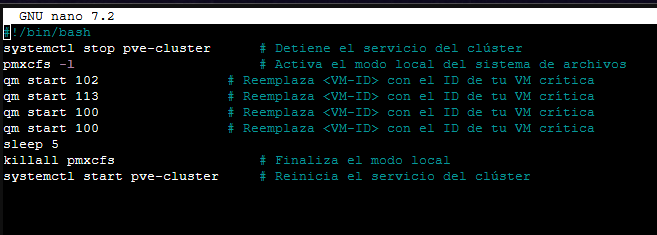
Grant execution permissions to the script:
chmod +x /root/start_vms.sh
Step 2: Create the systemd service unit.
nano /etc/systemd/system/start_vms.service
Paste the following configuration:
[Unit]
Description=Start Critical VMs without Quorum
After=network.target

[Service]
Type=oneshot
ExecStart=/root/start_vms.sh

[Install]
WantedBy=multi-user.target
Step 3: Reload the systemd daemon and enable your new service.
systemctl daemon-reload
systemctl enable start_vms.service
This service will now cleanly start your specified VM before the cluster even attempts to synchronize, guaranteeing network infrastructure (like pfSense) comes online first.
Solution 3: Disable High Availability (HA)
If you utilize the Proxmox HA Manager, the cluster strictly requires quorum to manage VM states. If a VM is marked as HA, Proxmox will flatly refuse to boot it without consensus.
You can remove a VM from the HA pool from the web interface (Datacenter > HA) or via the command line:
ha-manager remove vm:<VM-ID>
This strips the strict cluster dependency from the VM, allowing local startup tools (like the script above) to function.
Solution 4: Fix a Ghost/Offline Node Configuration
If your cluster is permanently degraded (e.g., you permanently removed a node but it still shows up offline, blocking quorum), you need to remove it from the Corosync configuration entirely.
- Stop the cluster services:
systemctl stop pve-cluster corosync - Start the filesystem in local mode:
pmxcfs -l - Edit
/etc/pve/corosync.confand remove the dead node’s entry. - Stop local mode and restart the cluster:
killall pmxcfs
systemctl start pve-cluster
Conclusion
The “Waiting for Quorum” lock is fundamentally a protective mechanism designed to save your storage from total destruction in enterprise cluster environments. However, for homelabs or remote sites with erratic power grids, this protection can trap you offline if your primary firewall or DHCP server is virtualized inside the cluster.
By applying either the temporary pvecm expected 1 override, or implementing the permanent (though isolating) oneshot systemd bypass script, you can confidently ensure your critical infrastructure boots no matter the state of the surrounding Proxmox nodes.