
Umami is one of the best privacy-focused, self-hosted alternatives for web analytics. However, an extremely common issue when deploying it behind Cloudflare Tunnels is that the dashboard identifies the visitor’s country, but the City and Region fields appear empty (—).

In this guide, we will look at how to fix this telemetry “short circuit” by correctly configuring HTTP headers so that Cloudflare provides Umami with all the geographic information it needs.
The Problem: The Header “Short Circuit”
When traffic passes through Cloudflare, it injects a header called CF-IPCountry by default (e.g., with values like MX or US).
Umami’s internal logic dictates that if it receives geographic information via HTTP headers, it will assume that information is the sole source of truth and ignore its local database (MaxMind GeoDB). Since Cloudflare does not send the city or region by default, Umami records the country, looks for the city in the headers, doesn’t find it, and leaves the fields empty.
To solve this, we must have Cloudflare send the complete geographic package.
1. Configure Cloudflare (Managed Transforms)
Instead of relying on Umami’s local database, we are going to leverage the massive telemetry of Cloudflare’s Edge network to resolve the exact location and pass it to our container.
- Log in to the Cloudflare dashboard and select your domain.
- In the left sidebar, navigate to Rules > Settings.
- Select the Managed Transforms tab.
- Find the Add visitor location headers option and enable it.
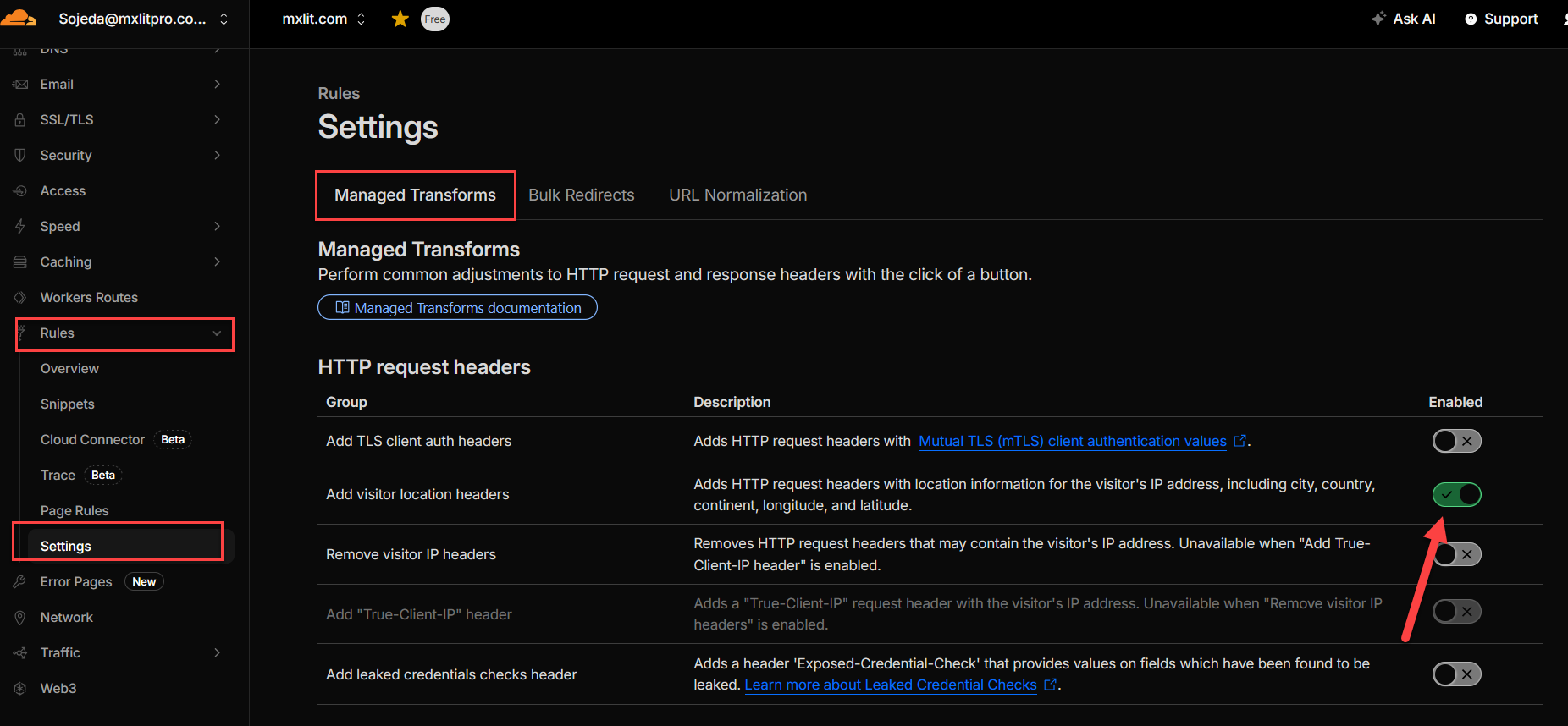
By enabling this, Cloudflare will start injecting CF-IPCity (City) and CF-RegionCode (State/Region) headers into all traffic flowing toward your tunnel.
2. Configure Umami (Docker Compose)
Now we must ensure Umami is configured to trust the IPs coming from the Cloudflare proxy. Edit your docker-compose.yml file and add the CLIENT_IP_HEADER variable.
services:
  umami:
    image: ghcr.io/umami-software/umami:postgresql-latest
    container_name: umami_app
    environment:
      # Database connection string
      DATABASE_URL: postgresql://umami_user:password@umami_db:5432/umami_data
      DATABASE_TYPE: postgresql
      APP_SECRET: your_random_secret

      # Tell Umami to trust the real IP forwarded by Cloudflare
      CLIENT_IP_HEADER: cf-connecting-ip

    depends_on:
      - umami_db
    restart: unless-stopped
3. Apply Changes and Verify
Recreate your container to apply the new environment variable:
# Recreate the Umami container to apply the new environment variables
docker compose up -d
Perform a test visit to your website (preferably from a mobile network or incognito mode). In the Umami dashboard, you will now see that the geographic telemetry is complete.

Conclusion
Delegating geolocation to Cloudflare not only solves the issue of empty fields but also optimizes your Umami instance by not relying on a local GeoIP database that requires constant updates. With a couple of clicks in Cloudflare and one line in Docker, your analytics are now much more precise.
End of transmission.