
When a user is terminated in Active Directory, the first line of defense is instantly engaged: denial of corporate access, which disconnects their VPN sessions and blocks interactive logins through the Domain Controller (DC).
However, there is a critical risk vector. If the employee (or a malicious attacker) has their corporate laptop, the local Windows Cached Credentials will continue to operate. This allows them to log into the machine “offline” (from the domain) and extract sensitive files locally onto a USB drive without needing to be connected to the corporate VPN or internal network.
In this article, we will cover the entire “Zero-Trust Endpoint Isolation” flow to fundamentally remediate this scenario using PowerShell, and how BitLocker encryption acts as the ultimate hardware protection against a local administrator hijack.
The Local Script Solution (XDR / Intune)
To contain local asynchronous access, we use remote deployment platforms such as Cortex XDR or UEMs like Microsoft Intune to push a restrictive script that runs under the highest local authority account: SYSTEM.
This script isolates the computer from unauthorized users through restrictive denial using internal security identifiers (SIDs). The script is capable of enumerating the Win32_UserProfile repository, finding which domain users own a cached profile on that installed computer, and pushing their exact SID into Windows restrictive policies using the secedit module.
# ============================================================================
# Script: Endpoint Containment & Session Purge (Local & RDP Lockdown)
# Purpose: Deny local AND remote desktop logon for all local users and local
#          admins (excluding Domain Admins and built-in Admin), then logoff.
# Execution: Designed to run locally via SYSTEM (Intune/XDR/EDR Solutions).
# ============================================================================

try {
    # 1. Initialize a list to hold all the account SIDs we need to block
    $sidsToBlock = New-Object System.Collections.Generic.List[string]

    # Helper function to safely add SIDs
    function Add-BlockSID ($sid) {
        # Exclude Built-in Admin (-500), Domain Admins (-512), System (-18), Local Service (-19), Network Service (-20)
        if ($sid -and
            $sid -notmatch "-500$" -and
            $sid -notmatch "-512$" -and
            $sid -notmatch "^S-1-5-18$" -and
            $sid -notmatch "^S-1-5-19$" -and
            $sid -notmatch "^S-1-5-20$") {
            if (-not $sidsToBlock.Contains($sid)) {
                $sidsToBlock.Add($sid)
            }
        }
    }

    # 2. Get the Local Administrators group using its well-known SID
    $localAdminGroup = Get-LocalGroup | Where-Object { $_.SID -eq "S-1-5-32-544" }

    if ($localAdminGroup) {
        # Get all members of the Local Administrators group
        $adminMembers = Get-LocalGroupMember -Group $localAdminGroup.Name -ErrorAction SilentlyContinue

        foreach ($member in $adminMembers) {
            if ($member.ObjectClass -ne "Group" -and $member.PrincipalSource -ne "Unknown") {
                Add-BlockSID $member.SID.Value
            }
        }
    }

    # 3. Get all local users
    $localUsers = Get-LocalUser | Where-Object { $_.Enabled -eq $true }

    foreach ($user in $localUsers) {
        Add-BlockSID $user.SID.Value
    }

    # 4. Get all cached user profiles (offline Domain Users)
    $userProfiles = Get-CimInstance Win32_UserProfile -ErrorAction SilentlyContinue | Where-Object { $_.Special -eq $false }

    foreach ($profile in $userProfiles) {
        Add-BlockSID $profile.SID
    }

    # 5. Optionally Block well-known groups like Remote Desktop Users (S-1-5-32-555) by default
    Add-BlockSID "S-1-5-32-555"

    if ($sidsToBlock.Count -gt 0) {
        Write-Output "Accounts (SIDs) targeted for Deny Interactive & Remote Logon:"
        $sidsToBlock | ForEach-Object { Write-Output " - $_" }

        # --- PART 1: Apply Deny Local and Remote Logon Policies ---

        # Define temporary paths for secpol manipulation
        $exportPath = "$env:TEMP\secpol_export.inf"
        $importPath = "$env:TEMP\secpol_import.inf"
        $dbPath = "$env:TEMP\secpol_temp.sdb"

        # Export current user rights assignment policy
        secedit /export /cfg $exportPath /areas USER_RIGHTS | Out-Null

        # Read carefully handling potential Unicode BOM from secedit
        $policyContent = Get-Content -Path $exportPath -Encoding Unicode -ErrorAction Stop

        # Format for secedit INF requires asterisk prefix (*S-1-5-21-...)
        $formattedSids = $sidsToBlock | ForEach-Object { "*$_" }
        $accountsString = $formattedSids -join ","

        $newPolicyContent = New-Object System.Collections.Generic.List[string]
        $localLogonFound = $false
        $remoteLogonFound = $false
        $privilegeRightsFound = $false

        # Parse and modify the INF file contents
        foreach ($line in $policyContent) {
            if ($line -match "^\[Privilege Rights\]") {
                $privilegeRightsFound = $true
                $newPolicyContent.Add($line)
            }
            elseif ($line -match "^SeDenyInteractiveLogonRight") {
                $newPolicyContent.Add("SeDenyInteractiveLogonRight = $accountsString")
                $localLogonFound = $true
            }
            elseif ($line -match "^SeDenyRemoteInteractiveLogonRight") {
                $newPolicyContent.Add("SeDenyRemoteInteractiveLogonRight = $accountsString")
                $remoteLogonFound = $true
            }
            else {
                $newPolicyContent.Add($line)
            }
        }

        # If [Privilege Rights] didn't exist at all, add it at the end
        if (-not $privilegeRightsFound) {
            $newPolicyContent.Add("[Privilege Rights]")
        }

        # Inject the rights if they didn't exist previously under [Privilege Rights]
        for ($i = 0; $i -lt $newPolicyContent.Count; $i++) {
            if ($newPolicyContent[$i] -match "^\[Privilege Rights\]") {
                if (-not $localLogonFound) {
                    $newPolicyContent.Insert($i + 1, "SeDenyInteractiveLogonRight = $accountsString")
                }
                if (-not $remoteLogonFound) {
                    $newPolicyContent.Insert($i + 1, "SeDenyRemoteInteractiveLogonRight = $accountsString")
                }
                break
            }
        }

        # Save and apply the modified policy (secedit relies on Unicode natively)
        $newPolicyContent | Out-File -FilePath $importPath -Encoding Unicode
        secedit /configure /db $dbPath /cfg $importPath /areas USER_RIGHTS | Out-Null

        # Cleanup policy temp files
        Remove-Item -Path $exportPath, $importPath, $dbPath -ErrorAction SilentlyContinue

        Write-Output "Security policies (Local & RDP Deny) applied successfully using SIDs."
    } else {
        Write-Output "No matching accounts found to block. Proceeding to terminate sessions."
    }

    # --- PART 2: Force Immediate Logoff for EVERYONE ---

    # Retrieve all active and disconnected sessions
    $quserOutput = quser 2>$null

    if ($quserOutput) {
        $sessions = $quserOutput[1..($quserOutput.Length - 1)]

        foreach ($session in $sessions) {
            $tokens = $session -split '\s+' | Where-Object { $_ -ne '' }

            # The session ID is usually at index 1 or 2 depending on the session state
            $sessionId = if ($tokens[1] -match '^\d+$') { $tokens[1] } else { $tokens[2] }

            # Ensure we captured a valid integer session ID before terminating
            if ($sessionId -match '^\d+$') {
                Write-Output "Terminating session ID: $sessionId"
                logoff $sessionId
            }
        }
    } else {
        Write-Output "No active user sessions found to terminate."
    }

    Write-Output "Endpoint containment protocol completed."

} catch {
    Write-Error "An error occurred during containment: $_"
}
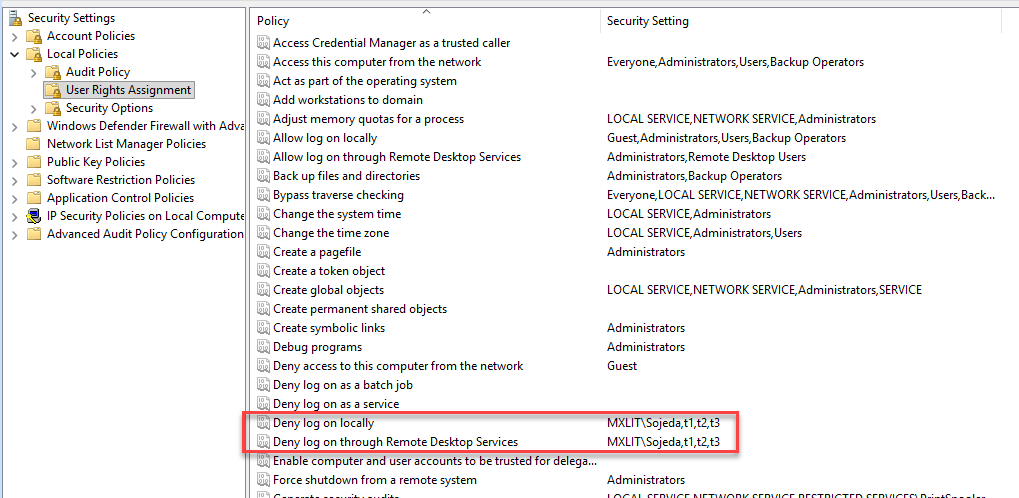
By utilizing a smart exclusion flow (that is, allowing exclusive access to the main Domain Admins group and the built-in Local Administrator account), we generate a Deny Interactive Logon Right blocklist. Any login attempt by a standard user is immediately bounced with a categorical “Access denied by local policy” error.
Mitigating Critical Physical Bypass with Hardware
We can assume this programmatic mechanism is the panacea. It breaks active sessions using quser and logoff, and modifies security templates banning the user from returning. But what happens when the attacker reboots the laptop using an external rescue bootable USB drive?
Famous tools like Hiren’s Boot CD, Kali Linux or DaRT, are designed to “cold mount” the local Windows C:\ partition. By accessing it this way, all restrictions of the running operating system itself are evaded. With a basic registry editor or pre-installed applications in these utilities (like NTPWEdit), the offender could access the critical file at C:\Windows\System32\config\SAM and brutally change the built-in Local Administrator’s password (SID -500), skipping the fence we designed.
The Fundamental Role of BitLocker
This is where the indisputable importance of FDE (Full Disk Encryption) stands out. Primarily, BitLocker.
If the laptop’s disk is encrypted from its provisioning (preferably supported by a modern TPM 2.0 chip), the simple vandal act of inserting a secondary Hiren’s boot USB or trying to move an SSD drive to another computer will hopelessly trigger the BitLocker Recovery blue screen.
The booted offline environment simply will not be able to mount the C:\ system partition. Whoever operates the rescue equipment will see the whole disk under the veil of an unreadable RAW space. To even attempt to view the Windows directories or access the SAM, they will have to enter the extremely long numeric Recovery Key, generated singularly and backed up exclusively on the Active Directory servers or Azure’s Intune console by IT administrators. Otherwise, the “cold reboot” attack fails miserably.
Conclusion
A truly resilient corporate cybersecurity architecture is not made on a single level of defense; it is a deep choreography in Zero-Trust.
The perimeter identity lockdown eradicates VPN access; the PowerShell Scripting Isolation (used by EDR and UEM tools) implacably purges the offline physical connection in-flight; finally, but no less crucial, the full volume encryption BitLocker (FDE) acts as the final metallic padlock that seals and hermetically encapsulates the hard drive’s materiality itself, denying low-level exfiltration by pure structural design. These pillars work symmetrically together, preventing technical gaps from becoming tragic cracks of corporate disaster.