
The Problem: Eliminating Single Points of Failure in Hybrid Infrastructure
In infrastructure design, High Availability (HA) and mitigating single points of failure usually require complex and expensive architectures. When seeking resilience for personal services or documentation platforms, the goal is to ensure web traffic automatically switches if a physical node or cloud provider goes down.
One approach to achieve this is maintaining a hybrid architecture: a commercial VPS as the primary node and an On-Premise server as backup. Through CI/CD (such as GitHub Actions), source code can be compiled and synchronized simultaneously to both nodes. Data and web containers are replicated, but the challenge lies in routing: how do we failover public traffic without paying for a dedicated Load Balancer?
This is where Cloudflare Tunnels (Zero Trust) comes in, and where the main configuration obstacle arises.
The Cloudflare Limit: DNS Collisions and 502 Errors
Conventional logic dictates installing a cloudflared agent on the VPS and another on the On-Premise server, creating two distinct tunnels in the dashboard. The problem arises when trying to route the primary domain to both tunnels.
Balancing in a single tunnel using multiple rules: Configuring sequential rules (Rule 1 to VPS, Rule 2 to On-Prem) results in a 502 Bad Gateway error. The Agent receiving the request will attempt to resolve a target that does not exist in its own local network, cutting the connection instead of jumping to the second rule.
Separate tunnels: Assigning the exact same domain to two different logical tunnels generates a DNS collision error. Cloudflare creates an automatic CNAME record per tunnel and does not allow two tunnels to compete for the same root domain in its free tier.
The platform reserves intelligent routing for its commercial Load Balancing product. However, a robust architectural alternative exists.
The Solution: Single Tunnel Architecture with Multiple Replicas
To achieve HA and automatic failover, the strategy consists of using a single logical tunnel with multiple physical connectors (replicas).
By using the same authorization token on multiple servers, Cloudflare groups those agents. For this to operate transparently, the network infrastructure at the Docker level must be standardized to abstract the differences of the physical hosts.
Step 1: IP Abstraction via Isolated Docker Networks
This is the critical point of the configuration. It is highly likely that the VPS and the On-Premise server operate on different IP subnets. If you configure Cloudflare to point to a static IP (e.g., 172.25.0.3), the configuration will break if the secondary node assigns a different IP to its container.
The solution is to expose the service through the container name, not its IP. To do this, the Cloudflare agent (cloudflared) and the web server (nginx) must coexist within the same isolated Docker network (tunnel_net). Docker’s internal DNS will resolve the container name regardless of the underlying IP assigned by the host.
The web container name must be identical on both servers.
# docker-compose.yml - Apply the same structure on BOTH servers
services:
  web:
    image: nginx:alpine
    container_name: Dedicated_CT_mxlit_web
    volumes:
      - /home/deploy/site/public:/usr/share/nginx/html:ro
    networks:
      - tunnel_net
    restart: unless-stopped

  cloudflared:
    image: cloudflare/cloudflared:latest
    container_name: Dedicated_CT_mxlit_agent
    command: tunnel run
    environment:
      - TUNNEL_TOKEN=${CLOUDFLARE_TOKEN}
    networks:
      - tunnel_net
    restart: unless-stopped

networks:
  tunnel_net:
    driver: bridge
Step 2: Configure the Single Path
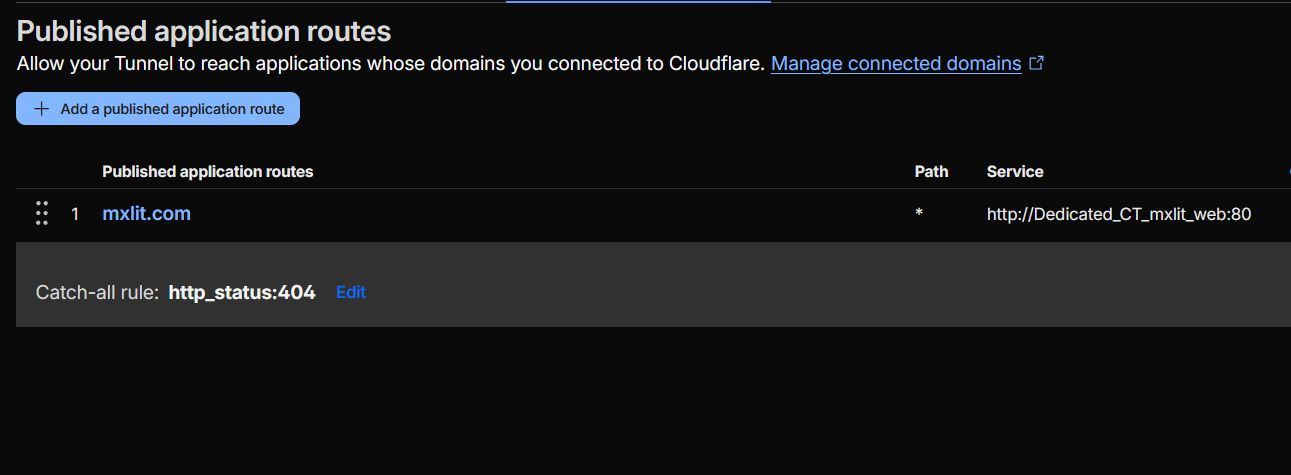
In the Cloudflare Zero Trust panel, remove any redundant tunnels and keep only one. In the Public Hostnames tab, create a single rule pointing to the container name we defined in the previous step:
- Public Hostname:
yourdomain.com - Service:
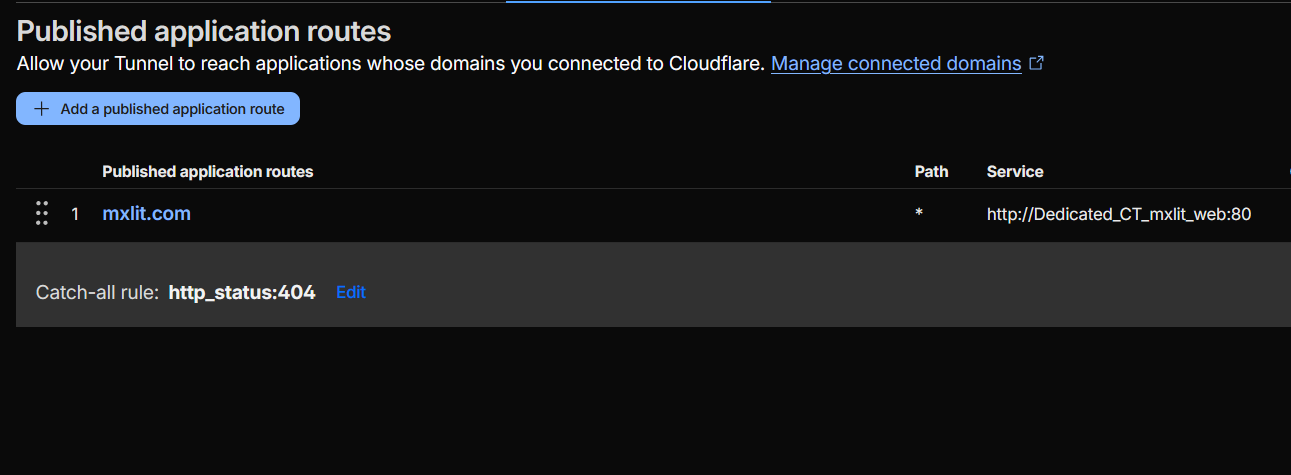
http://Dedicated_CT_mxlit_web:80
Step 3: Deploy Identical Connectors
Instead of creating a new tunnel for the secondary node, use exactly the same access token (TUNNEL_TOKEN) in the docker-compose.yml file for both the VPS and the local server. When starting the containers, both agents will report to Cloudflare under the same logical identity.
Technical Operation: Geo-Balancing and Active Failover
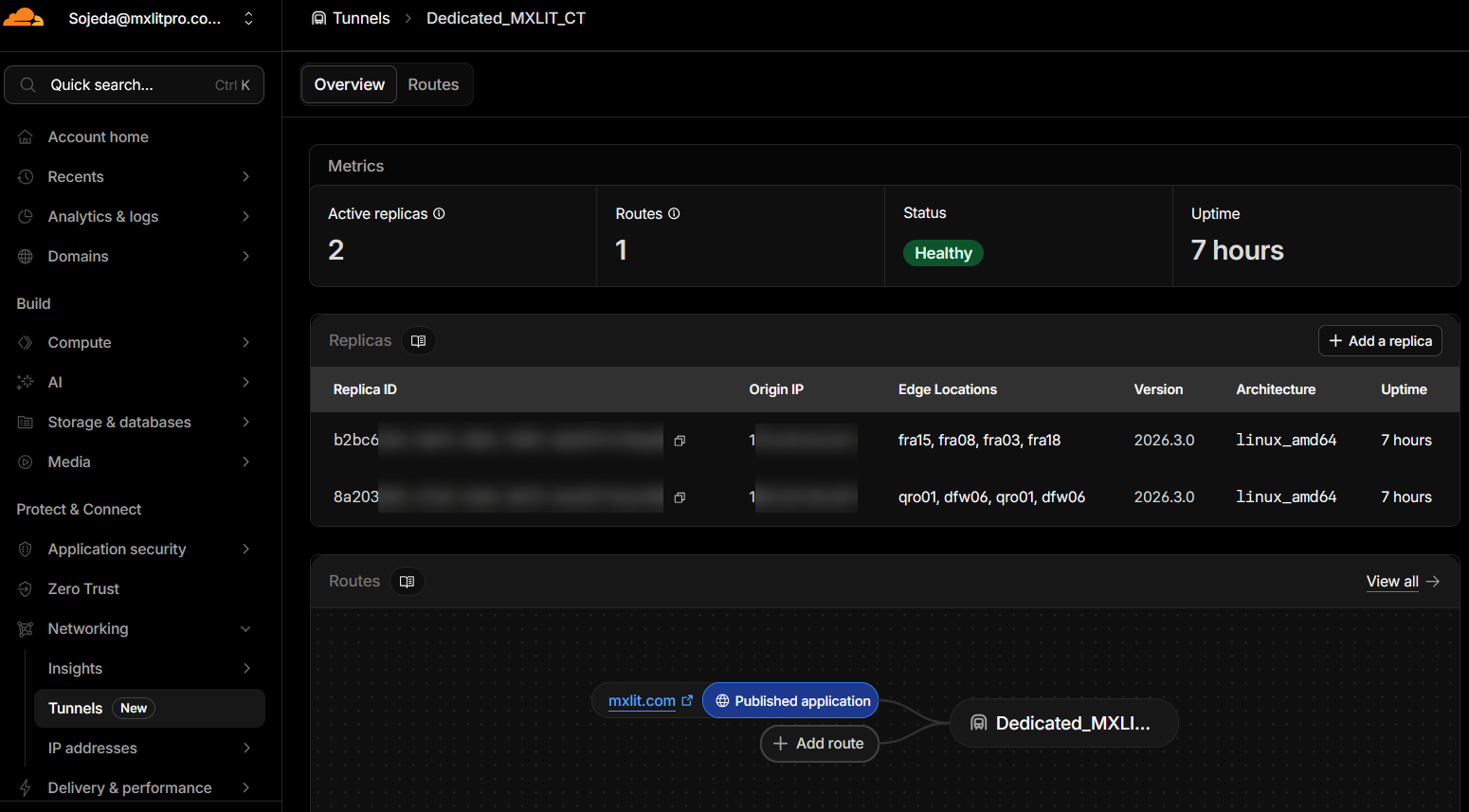
When checking the Overview tab of the tunnel in Cloudflare, you will notice multiple “Replicas” listed as connected. What the platform is executing under the hood with this single-tunnel configuration is a highly sophisticated Geographic Load Balancing (Active-Active).
To understand how traffic is routed, we must analyze three key concepts reflected in the panel:
1. Connections to “Edge Locations”
Each cloudflared agent (replica) opens secure outbound connections to the Cloudflare Data Centers (Edges) that are geographically closest to that server. Observing a real configuration:
- VPS Replica (Europe): Connects to
franodes (Frankfurt, Germany). This indicates that the VPS is hosted in a European data center. - On-Premise Replica (America): Connects to
qronodes (Querétaro, Mexico) anddfwnodes (Dallas, USA). Since the local server is physically in Mexico, the agent automatically seeks the fastest fiber optic route available in its region.
2. Intelligent Latency-Based Routing (Anycast)
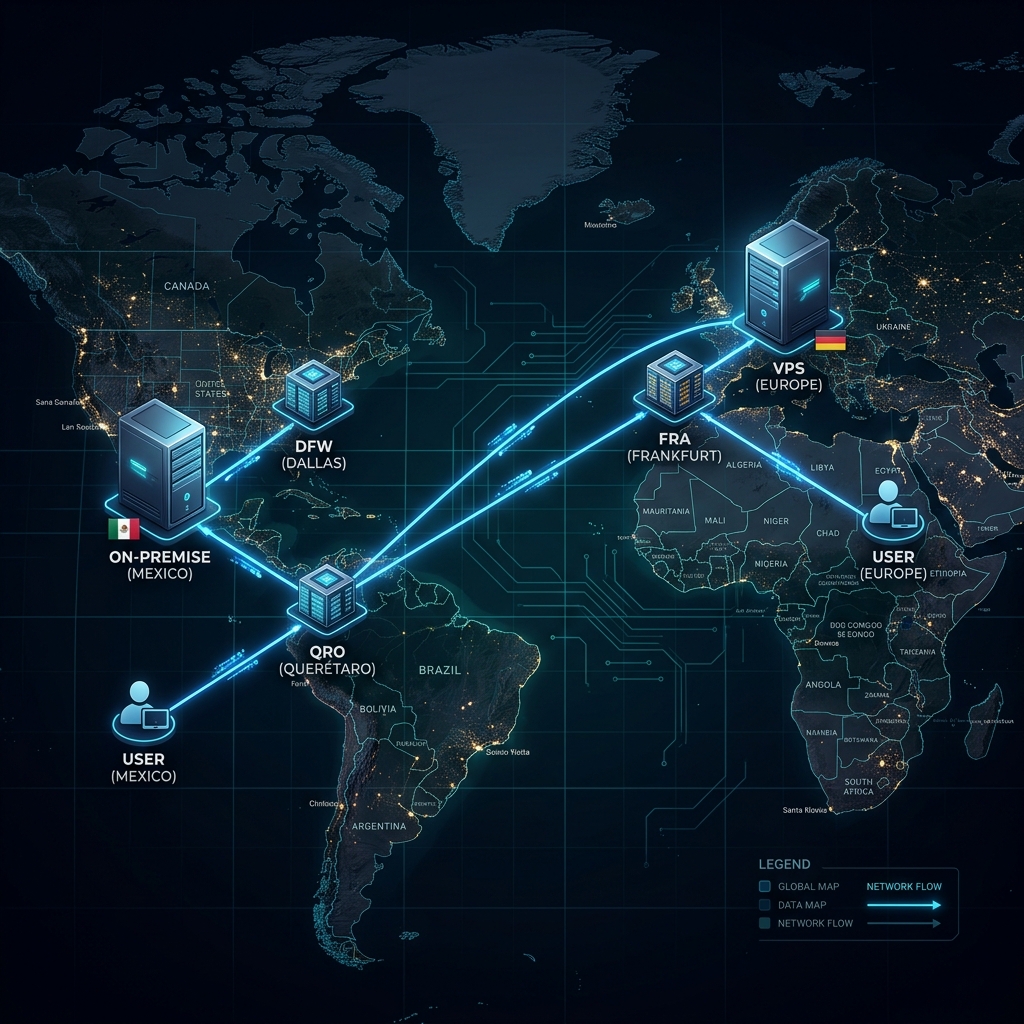
Both servers are active and processing traffic simultaneously. Cloudflare does not route randomly; it will always attempt to send the user to the server that offers the shortest response time (latency).
- Scenario A (European Traffic): If a visitor accesses the web from Spain, their request reaches the Cloudflare Edge in Europe. By detecting that a replica is connected right there (Frankfurt), Cloudflare delivers the traffic directly to the VPS.
- Scenario B (American Traffic): If a visitor accesses from Mexico or the United States, the request enters through the Edges in Querétaro or Los Angeles. Cloudflare detects that the On-Premise server is connected to those local Edges, so it sends the traffic directly to your home server.
3. Transparent Structural Failover
This is where the High Availability design shines. What happens if the VPS in Europe suffers a network outage, hardware failure, or you turn it off for maintenance?
The agent’s connections to Frankfurt are interrupted. If that same European visitor tries to access the site, Cloudflare determines: “My Frankfurt replica is no longer responding, but the Dallas/Querétaro replica remains operational.”
In a matter of milliseconds, Cloudflare takes the European user’s request, transports it through its own fiber optic backbone network across the ocean, and delivers it to your On-Premise server. The visitor never encounters a 502 error; the site simply stays online, and the transition is imperceptible to the end user beyond a few additional milliseconds of loading due to physical distance.
Operational Consideration: Web Container State
There is a specific scenario that interrupts this logic. If the Agent container (Dedicated_CT_mxlit_agent) remains active, but the web container (Dedicated_CT_mxlit_web) stops or enters a crash loop, Cloudflare will still report the replica as “Healthy.”
Traffic will be sent to the agent, but the agent will not be able to resolve the connection in the internal Docker network, returning a 502 error to the visitor. Cloudflare’s structural failover reacts to the loss of the agent’s connection to the internet, not to internal local service failures.
Mitigation: It is fundamental to guarantee the stability of the web container through the restart: unless-stopped or always directive. This ensures that the internal service recovers automatically after host reboots, allowing the external failover mechanism to be reserved exclusively for infrastructure or network failures of the provider.

Final Considerations: Stateless Architectures in HA
The Crucial Requirement: Stateless Architectures
This entire Active-Active balancing architecture works flawlessly for one fundamental technical reason: the site is static and stateless.
By using a static site generator (like Hugo) and deploying through an automated pipeline (GitHub Actions), we ensure that the physical server in Europe and the local server in Mexico receive exactly the same code and files (rsync) at the same time. The web containers become independent and disposable clones.
It is vital to understand that this “single tunnel with multiple geographic replicas” design is not a universal solution and has strict limitations depending on the application you are hosting.
When does it work perfectly?
- Static Sites: Blogs generated with Hugo, Jekyll, Astro, or pure HTML/CSS pages.
- Stateless Applications: APIs or containers that do not store local sessions or require real-time synchronized databases, where any node can respond to any request without depending on previous history.
When will it cause a disaster?
- Applications with Local Databases: If you try to do this with a traditional WordPress, an e-commerce, or any system that depends on user sessions and unsynchronized databases.
- The State Problem: If a user enters your store and Cloudflare routes them to the VPS in Europe, the user adds a product to their cart (session saved in Europe). If on their next click Cloudflare decides that latency to Mexico is lower or the VPS has a micro-outage, the user will be redirected to the On-Premise server. Since that server in Mexico does not have the synchronized database, the user will see an empty cart or a closed session.
For dynamic (stateful) applications, you would require multi-region database replication (such as a Galera cluster or cloud databases), which adds a layer of complexity and latency that breaks the purpose of this simple, low-cost deployment.
Conclusion
Building a Zero-Cost HA infrastructure is possible by leveraging Cloudflare Tunnels beyond their traditional use case. Leveraging Cloudflare’s Anycast protocol by assigning the same tunnel to different providers and continents is an excellent way to build a private, fault-tolerant, and free Content Delivery Network (CDN). By abstracting container names in Docker and eliminating database dependency, we achieve corporate-grade resilient infrastructure optimized specifically for static workloads. This symmetric orchestration ensures that your platform remains available and resilient, regardless of the physical origin of the traffic or the stability of a specific provider.